Quick Answer
How do you automate real estate follow-up without sounding generic?
Automated follow-up sounds robotic when it ignores context — it sends the same message to every lead regardless of what they viewed, when they inquired, or what they said. Personal-feeling automation uses behavioural triggers (a lead saves a specific property, returns to your site, or replies to a message) to send responses tied to that exact action. The copy is written in first person, references a specific detail from the lead's inquiry, and arrives at a moment when the content is relevant. The sequence, not the tool, is what determines whether a lead calls you back or unsubscribes.
Key Takeaways
- Leads contacted within 5 minutes are 21x more likely to qualify than those contacted after 30 minutes, per the MIT Lead Response Management Study — yet the average real estate agent takes over 15 hours to respond, according to Inman's 2025 Real Estate Technology Survey.
- Automated responses that are triggered by specific lead behaviour — a listing view, a saved search, a price-drop alert click — generate up to 14% higher open rates and twice the click-through rate of generic broadcast campaigns, per segmentation research cited by HubSpot.
- 50% of all sales happen after the fifth follow-up touch, per InsideSales.com — but 44% of agents give up after one "no" and never send a second message.
- Personalized emails generate 6x higher transaction rates than generic first-name-only sequences, a figure consistent across multiple independent email benchmark studies.
- Velocify's analysis of millions of lead records found that calling within the first minute of inquiry produces a 391% improvement in contact rate compared to waiting two minutes — making an instant automated text acknowledgement the single highest-ROI action in your follow-up stack.
- Leads who receive six or more contact attempts convert at rates 70% higher than those receiving fewer touches, per Real Trends buyer conversion research.
Priya Mehta, a solo agent in Pune, was spending 45 minutes every morning manually copy-pasting follow-up messages. She had a CRM. She had email templates. What she had built, without realising it, was a system that sent the same message to a first-time buyer who had viewed a ₹45 lakh apartment at 11 PM and to a returning investor she had already spoken to twice. Her reply rate was under 4%. When she audited her sequences, she found the word "I" appeared in the first line of every single one. The messages sounded like announcements, not conversations.
This article breaks down exactly why automated follow-up fails — and how to rebuild it so each message feels like it was written for one person at one specific moment. You will get the trigger logic, the word-for-word scripts, the timing data, and the sequence structure that converts leads without requiring you to type a single word after setup.
The 'robot' problem with automation
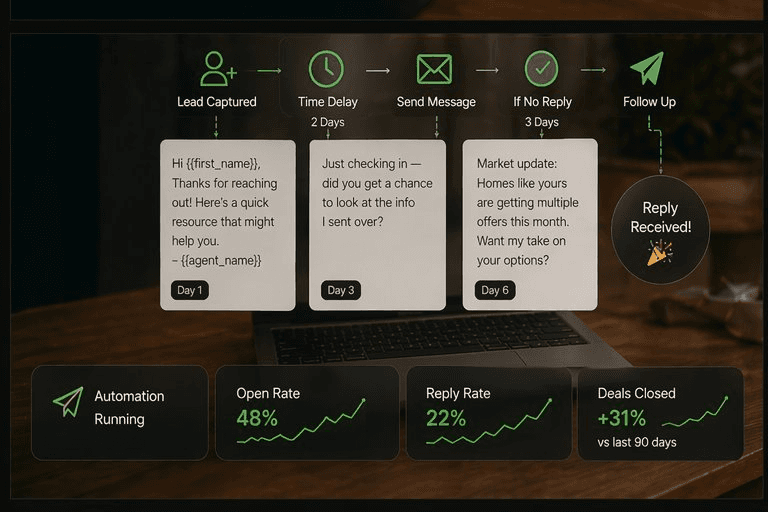
The robot problem is not a technology problem. It is a sequence design problem. Most agents set up automation by building a drip campaign — a fixed series of messages sent at fixed intervals after a lead enters a form. Day 1, Day 3, Day 7, Day 14. Every lead gets the same messages in the same order, regardless of whether they just asked about a 3BHK in Baner or a commercial plot in Hadapsar, regardless of whether they replied on day 2 or went completely silent. The automation treats all leads as identical, so every message sounds like it was written for no one in particular.
The data tells you how much this costs. Inman's 2025 Real Estate Technology Survey found the average agent takes 917 minutes — over 15 hours — to contact a new lead. During that window, the lead has typically browsed four or five other options, possibly contacted another agent who responded faster, and mentally moved on. When the delayed message finally arrives, it reads as generic because it was built for that exact scenario: a cold contact who needs to be "reactivated."
Stat: The average real estate agent takes 917 minutes — over 15 hours — to respond to a new lead inquiry. — Inman Real Estate Technology Survey, 2025
The fix is not to write warmer copy for cold sequences. It is to stop building cold sequences entirely. Personal-feeling automation triggers messages based on what the lead actually did — not based on the date they entered a database. A lead who views the same listing three times in 48 hours needs a different message than a lead who submitted a form and has not been back since. Your CRM already has that data. Most agents never use it to change what gets sent.
What makes automated follow-up feel personal
Personalisation in follow-up is not the same as the merge tag. Research on email performance consistently shows that messages referencing a specific action — a property the lead viewed, a neighbourhood they searched, a price bracket they filtered — generate up to 14% higher open rates and twice the click-through rate compared to generic broadcasts. The difference between a merge tag and a behavioural reference is the difference between "Hi Rahul" and "Hi Rahul — I noticed you came back to the Kharadi listing twice. Happy to answer questions before you come in."
Three specific elements make an automated message feel personal:
1. The trigger is specific to an action, not a time interval. "You saved a search for 2BHK flats under ₹60L" is specific. "It's been 7 days since you signed up" is time-based and impersonal. The former shows you are paying attention. The latter shows your CRM is.
2. The opening line is not about you. "I help buyers find the right property in Pune" is an introduction. "You came back to that listing on Vithalwadi Road — want me to book a walkthrough before it gets an offer?" is a response to something real. Every message that opens with "I" instead of "you" signals that the sender did not read anything about the recipient before writing.
3. The ask is proportionate to the relationship stage. Asking for a call on the first automated message is the email equivalent of proposing on the first date. A better first-message ask: confirm a detail, answer a question, or offer something useful with no strings. "Would it help if I sent you the last 10 comparable sales for that building?" is a yes/no question that moves the conversation forward without demanding a time commitment.
Stat: Personalized emails generate 6x higher transaction rates than generic first-name-only sequences. — Email benchmarking research, multiple sources including HubSpot and Experian
Writing in your voice
The fastest way to make automated messages sound like a person wrote them is to actually write them — once — in exactly the way you speak to clients in person. Most agents make the mistake of writing "formal email" copy for automated sequences, even though they would never talk to a client that way on the phone. If you normally say "honestly, that building is one of the better-maintained ones in that stretch" to a client, write exactly that sentence in your email. If you never use the phrase "leverage your position in the current real estate landscape," do not write it in your automation.
A practical calibration test: read your draft message out loud. If you would not say it that way to a client sitting across from you, rewrite it. This eliminates passive constructions, corporate hedging, and the filler language that signals to a reader that what they are reading was not written specifically for them.
Subject lines follow the same rule. The subject lines with the highest open rates in real estate email sequences are short and conversational — under 50 characters, no capitals on every word, sometimes not even a complete sentence. "Quick question about the Baner listing" outperforms "Important Update Regarding Your Property Search Inquiry" on every device and every time of day. The professional-sounding subject line reads like a solicitation. The casual one reads like a colleague.
One more structural rule: keep automated messages short. Under 150 words for a first-touch message. Under 200 words for a nurture sequence email. The reader's willingness to engage with your message is inversely proportional to how long it takes to read. Long messages signal that the sender is doing something for themselves — filling a communication quota — not actually trying to help the reader. Short messages signal that you read the room.
Why timing matters more than copy
You can write the best follow-up message of your career and lose the lead if it arrives at the wrong moment. The MIT Lead Response Management Study — conducted by Dr. James Oldroyd and published via Harvard Business Review — analysed over 100,000 contact attempts and found that leads contacted within 5 minutes of inquiry are 21 times more likely to qualify than those contacted after 30 minutes. The decay is steep: contact odds drop by 80% in the first 5 minutes after that window closes.
Stat: Leads contacted within 5 minutes of inquiry are 21x more likely to qualify than those contacted after 30 minutes. — MIT Lead Response Management Study, Dr. James Oldroyd
This is where automation does something no human can do consistently: respond in under 60 seconds, at 2 AM on a Sunday. Velocify's analysis of millions of lead records found a 391% improvement in contact rate for leads called within the first minute versus the second minute. The decay curve is that steep immediately after submission. The lead is still on their phone, still thinking about the property, still available. By minute three, they have switched apps. By hour one, they have moved on.
Timing inside the sequence matters too, not just for the first message. The NAR Lead Response Study found the following appointment conversion rates by response timing: 26% when contacted within 1 minute, 17% within 5 minutes, 7% within 1 hour, and 3% within 24 hours. That is roughly an 8x difference in outcome between a 1-minute response and a 1-hour response — with the same lead and the same message.
For after-hours leads — and according to research, 62% of online real estate inquiries come outside standard business hours — the correct approach is an automated acknowledgement in under 60 seconds followed by a human follow-up first thing the next morning. The automated message does not try to have the conversation. It acknowledges the inquiry, references the specific property, and sets a clear expectation: "I'll call you at 9 AM tomorrow with more details on this one." The human who makes that 9 AM call is not a cold contact anymore. They are the follow-up to something the lead already agreed to.
The behavioural trigger system
A behavioural trigger system replaces the time-based drip sequence with a set of if-then rules connected to actual lead activity. The result is that every automated message that goes out is tied to something the lead just did — which is why it feels relevant instead of scheduled.
The four triggers that produce the highest engagement in real estate follow-up sequences are:
Listing view (3+ times). A lead who returns to the same property multiple times has a question they have not yet asked. Trigger: "I saw you came back to [Property Name] — is there a specific detail you want me to look into before your next step?" Do not add a CTA beyond that question. The response rate on this trigger, when written conversationally, is significantly higher than any generic follow-up.
Price drop on a saved listing. This is the highest-intent trigger in the system. The lead saved the property because they were interested. The price just moved in their direction. Trigger (text, not email): "Good news — the flat you saved on MG Road just dropped ₹2.5L. Still interested? I can get you in this week." Text, not email, because this is time-sensitive and texts have a 99% open rate compared to email's 30-35%.
New listing matches saved search. The lead told you what they want by saving a search. When something matching that criteria appears, send it immediately. Every hour of delay is an hour the lead might find it independently — or receive it from a competing agent.
Silence after initial engagement. A lead who engaged in the first 48 hours and then went quiet is not a dead lead. They are in a waiting stage. The appropriate trigger is a low-commitment check-in at 7 days: "Still exploring, or did you find something? Happy to send over a few options you might have missed." Leads who receive six or more contact attempts convert at rates 70% higher than those receiving fewer, per Real Trends research — but only when each touch adds something, not when it repeats the same ask.
Scripts and templates you can use
The following scripts are built for real scenarios and are written to be pasted directly into your CRM automation. Each one uses a specific trigger, references a real detail, and has a single ask. Modify the bracketed fields; keep everything else as-is until your reply data tells you otherwise.
Message 1 — Instant acknowledgement (automated, within 60 seconds of form submission)
Hi [First Name] — got your enquiry about [Property/Area]. I'm pulling together the details and will send them over in the next few minutes. If you want to talk through it directly, reply here or call me at [Number]. — [Your Name]
Message 2 — 5-minute follow-up (automated, after instant acknowledgement)
Hi [First Name], [Your Name] here. I've seen a few people looking at [Property/Area] lately — here's what I'd want you to know before you decide: [one specific insight, e.g. "the society charges are lower than average for the area" or "there's a new metro station planned 400m away"]. Happy to send comparables or set up a visit. What works best?
Message 3 — Repeat listing view trigger (sent after 3rd view of same property)
[First Name] — I noticed you've come back to the [Property Name/Location] listing a few times. Is there a specific detail I can help clarify? Floor plan, maintenance charges, owner timeline — happy to find out whatever you need.
Message 4 — Price drop trigger (sent as SMS)
[First Name] — quick update: the [Property Name] you saved just dropped to [New Price]. Still on your list? I can get you a viewing this week. — [Your Name], [Your Number]
Message 5 — 7-day silence re-engagement
Hi [First Name] — checking in to see if you're still exploring or if your plans changed. Either way, no pressure — just want to make sure you have everything you need. If it would help, I can send over a shortlist of [2BHK/3BHK/etc.] options in [Area] that match what you were looking at.
InsideSales.com data shows that 40% of sales happen after the fifth contact and 50% of customers say no four times before saying yes — while 44% of agents give up after the first attempt. The sequence above gets you to five touches without repeating the same ask, and without each message sounding like a form letter.
How to review and improve over time
A follow-up sequence is not a set-and-forget asset. The metrics that tell you whether your automation is working are not open rates — those are distorted by Apple Mail Privacy Protection, which pre-loads images and inflates numbers. Track reply rate, appointment booking rate, and the specific message in your sequence where leads go silent. If 60% of leads drop off after Message 2 and before Message 3, that is the message to rewrite. If your reply rate on the repeat-view trigger is 4x your broadcast reply rate, that is where you allocate more trigger logic.
Run a 30-day A/B test on one variable at a time. Change the subject line first (the thing most affecting whether the message gets opened), then the opening line (the thing most affecting whether it gets read past the first sentence), then the ask (the thing most affecting whether you get a reply). Changing three variables simultaneously makes it impossible to know which change drove the result.
Pinova's AI follow-up module automatically tracks which trigger sequences produce the highest reply and appointment rates for each lead source — Magicbricks, Housing.com, organic website form, direct referral — and adjusts sending order and timing based on engagement patterns. Instead of reviewing metrics manually and writing new variants from scratch, you review a report every 30 days and confirm or override the recommended changes. The sequences themselves update based on what is actually converting, not on what you hoped would convert when you first built the system.
The one review that is not optional: check every message in your sequence every 90 days for accuracy. Property markets shift. Interest rate references go stale. Neighbourhood-specific facts change. An automated message that references a "new metro line coming in Q1" becomes noise — and erodes trust — the moment Q1 has passed and the message is still going out. Schedule a 90-day audit in your calendar and treat it like a required task, not an optional one.
Key Statistics: Real Estate Follow-Up and Lead Response
| Key Statistic / Finding | Source & Year |
|---|---|
| Leads contacted within 5 minutes are 21x more likely to qualify than those contacted after 30 minutes | MIT Lead Response Management Study, Dr. James Oldroyd |
| Calling a lead within the first minute of inquiry produces a 391% improvement in contact rate versus waiting two minutes | Velocify Lead Response Research, 2016 |
| The average real estate agent takes 917 minutes (over 15 hours) to respond to a new lead inquiry | Inman Real Estate Technology Survey, 2025 |
| NAR data shows appointment conversion rates of 26% when contacted within 1 minute, dropping to 3% within 24 hours | National Association of Realtors Lead Response Study |
| 50% of all sales happen after the fifth follow-up touch; 44% of agents quit after one attempt | InsideSales.com |
| Leads who receive 6 or more contact attempts convert at rates 70% higher than those receiving fewer touches | Real Trends Buyer Conversion Research |
| Behaviour-triggered emails generate up to 14% higher open rates and 2x the click-through rate of generic broadcasts | HubSpot Email Marketing Benchmarks |
| Personalized emails generate 6x higher transaction rates than generic first-name-only sequences | Experian Email Marketing Study / HubSpot |
| Text messages have a 99% open rate compared to email's 30–35% average | Multiple sources including Klaviyo and CTIA |
| 78% of converted real estate leads went to the agent who responded first | Icenhower Consulting |
| Automated lead management increases revenue by 10% in 6–9 months; marketing automation generates 451% more qualified leads | Aberdeen Group / Annuitas |
| 62% of online real estate inquiries arrive outside standard business hours | Real estate industry data, multiple sources including RoofAI |
Ready to put this into practice?
Pinova gives you the website, AI, CRM, and follow-up in one platform — live in 48 hours, no credit card required.
Start Your Free Trial
Frequently Asked Questions
How quickly should I follow up with a new real estate lead?
Within 5 minutes at most — and within 60 seconds if you can automate it. The MIT Lead Response Management Study found that leads contacted within 5 minutes are 21 times more likely to qualify than those contacted after 30 minutes. The practical solution for most solo agents is an automated text acknowledgement that fires within 60 seconds of form submission, followed by a personal call or message within the first 5 minutes. Waiting until the next business day is nearly the same as not following up at all.
What is the difference between a drip campaign and behaviour-triggered follow-up?
A drip campaign sends a fixed sequence of messages at fixed time intervals after a lead enters your system — Day 1, Day 3, Day 7 — regardless of what the lead does or does not do. Behaviour-triggered follow-up sends messages only when a lead takes a specific action: returning to a listing, saving a search, clicking a price-drop notification. The triggered approach produces higher reply rates because the message is relevant to something the lead just did. The drip approach often feels robotic precisely because the timing is disconnected from any real behaviour.
How many follow-up messages should I send before stopping?
Research from InsideSales.com shows that 50% of all sales happen after the fifth follow-up contact, and Real Trends data indicates that leads receiving six or more contact attempts convert at 70% higher rates than those receiving fewer. The practical answer: do not stop at two. Build a minimum of six touchpoints across a 30-day window, using different channels — text, email, and occasional call. After 30 days, move the lead to a longer-term nurture sequence rather than removing them entirely. Many leads who are not ready in month one close in month three or four.
Should I use text or email for automated real estate follow-up?
Both, for different purposes. Text messages have a 99% open rate and are most effective for time-sensitive triggers — a price drop on a saved listing, a new listing matching a saved search, or a same-day viewing window. Email is better for detailed content — comparable sales data, neighbourhood market reports, or property walk-through summaries — because it allows more space and is easier to forward. For the first message after an inquiry, a text is the faster and more effective channel. For ongoing nurture, email sequences perform well when personalised to what the lead viewed.
How do I avoid my automated messages going to spam?
Four specific practices reduce spam placement: keep message length under 200 words, avoid all-caps, excessive punctuation, or attachments in early-sequence messages; send from a consistent email address that receives replies (not a no-reply domain); ensure every recipient has opted in, even if the opt-in was a form submission; and authenticate your sending domain with SPF, DKIM, and DMARC records. CRM platforms that handle this configuration automatically reduce deliverability problems significantly. Monitoring bounce rates and unsubscribe rates monthly catches deliverability decay before it becomes a major problem.
What should the first automated message say after a lead submits a form?
Three things only: acknowledge the specific inquiry (name the property or area they asked about), confirm you have received it and are on it, and give them a clear next step or timeline. Keep it under 100 words. Do not include a full property description, a list of your credentials, or multiple calls to action. The goal of the first message is not to close the lead — it is to confirm you are a real person who is paying attention. A good template: "Hi [Name] — got your enquiry about [Property]. Pulling the details together now and will send them over shortly. If you want to talk through it, reply here or call me at [Number]. — [Your Name]"
How do I write automated messages that sound like me, not a template?
Read every message out loud before setting it live. If you would not say that sentence to a client sitting across from you, rewrite it. Replace passive constructions ("It has come to our attention") with direct ones ("I noticed"). Replace corporate hedges ("in the current real estate landscape") with specifics ("the last three flats in that building sold within 3 weeks of listing"). Subject lines under 50 characters with no title-case formatting perform consistently better than formal subject lines. And keep your sentences short — under 20 words each. Long sentences are harder to read and sound more like a newsletter than a conversation.
How often should I review and update my follow-up sequences?
Audit every sequence every 90 days for accuracy — facts, prices, and market references go stale. Review reply rates and drop-off points monthly: if 60% of leads go silent between messages 2 and 3, rewrite message 3. Run one A/B test per month — change one variable at a time (subject line first, then opening line, then the call to action) so your data is interpretable. Sequences built and never revisited routinely underperform sequences that are actively iterated, even when the initial build was strong.